
Bridging the Gap: Bringing Adaptive Hypermedia Intelligence to 3D Virtual Learning
12754_Adaptive Hypermedia Techniques for 3D Educational Virtual Environments.
This paper proposes a framework for building Adaptive 3D Educational Virtual Environments (EVEs) by extending the Adaptive Hypermedia Architecture (AHA!). It introduces specialized techniques for navigation support, content presentation, and user modeling tailored for 3D spaces using the X3D language.
TL;DR
This research explores how to transform static 3D Educational Virtual Environments (EVEs) into personalized learning experiences. By adapting the AHA! (Adaptive Hypermedia Architecture) engine, the authors developed a system that tracks a student's spatial behavior and dynamically modifies 3D objects and code examples to match their knowledge level.
Academic Positioning: This work bridges the gap between classic Adaptive Hypermedia (focused on 2D text/links) and Virtual Reality (VR) Education, focusing on the technical translation of pedagogical rules into 3D scene graphs.
Problem & Motivation: The "Occlusion" of Learning
Most adaptive education systems are built for 2D web pages. In that world, if a student clicks a link, the system assumes they "read" the content. In a 3D Virtual Environment, this logic breaks:
- Navigation isn't Discrete: There are no "next page" buttons; movement is continuous.
- The Visibility Problem: A student might stand in a virtual room but never look at the critical instructional object behind them.
- Spatial Chaos: Simply adding or removing 3D fragments (the way one might hide text) can lead to a cluttered, disorienting, or physically impossible environment (e.g., overlapping objects).
The authors' insight was to move away from "page-visit" tracking toward situational awareness—using sensors to monitor exactly what the user sees and does in 3D space.
Methodology: The Architecture of Adaptation
The system architecture sits between a standard web browser and the AHA! engine.
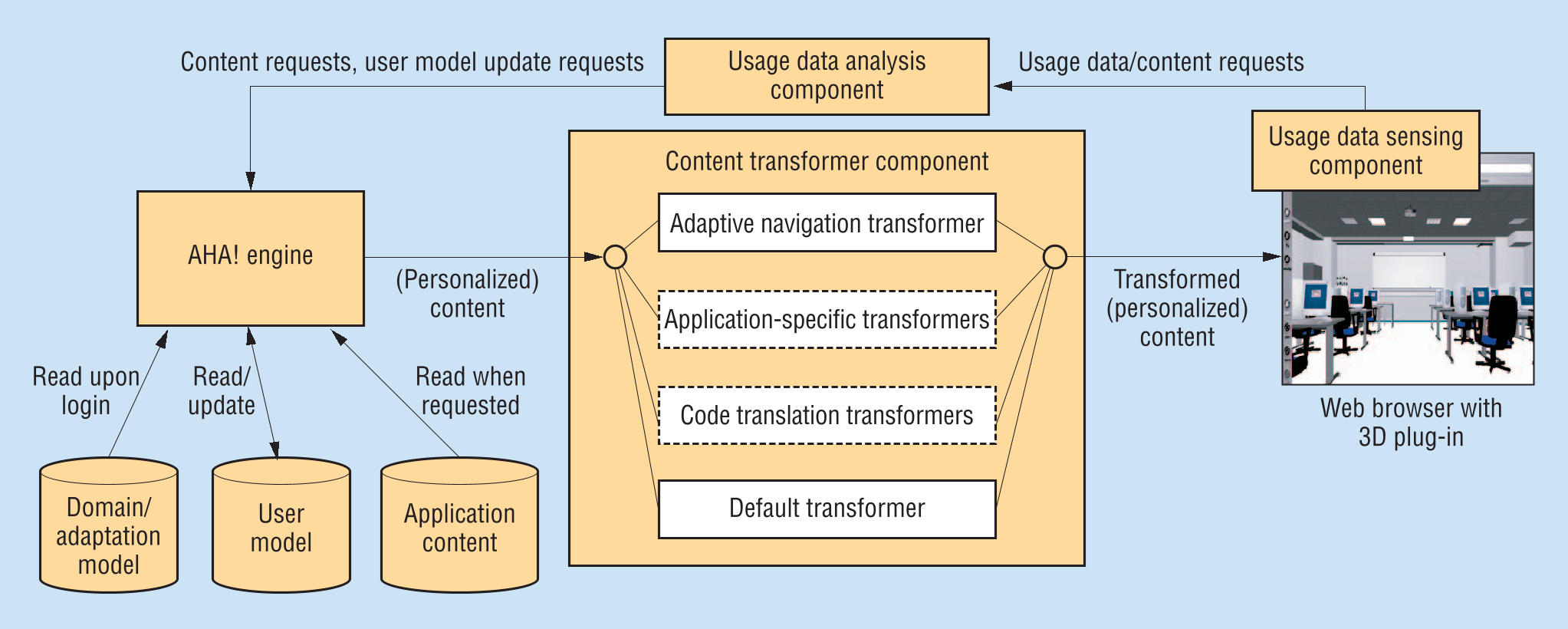
1. Usage Data Sensing
Instead of tracking URL requests, the system uses X3D ProximitySensors and scripts to record the user's position and orientation. This data is processed into "high-level events" (e.g., "Student spent 30 seconds examining the Light Source") to update the User Model.
2. Adaptive Navigation Support
Since there are no hyperlinks to highlight, the system provides visual cues within the 3D world. Suitable objects for the student's current level are surrounded by a glowing green wireframe box.
3. Content Transformation
The system uses XSL transformations to convert personalized XML data into X3D code. This allows the environment to:
- Scale Fragments: Make important educational objects larger or more detailed.
- Stretchtext for Code: Hide or show lines of 3D programming code based on the student's mastery of syntax.
Case Study: Learning X3D within X3D
The researchers built a virtual computer science classroom. Students interact with 3D objects to see the underlying code that creates them.
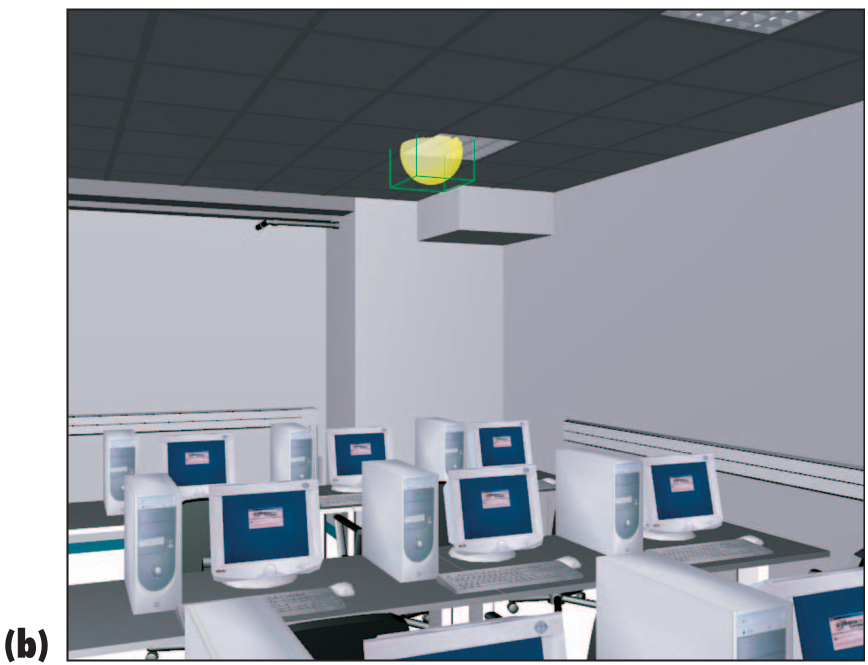
In the example above, if a student is ready to learn about "Light Sources," the system injects a semitransparent sphere into the scene to mark where an invisible PointLight is located. If the student isn't ready, these details are suppressed to prevent cognitive overload.
Experiments & Results: SOTA Comparison
While the authors acknowledge that a formal longitudinal study is the next step, they compare their approach to existing Intelligent Tutoring Systems like Steve and AutoTutor-3D.
- Comparison: Unlike previous systems that were often hard-coded for specific tasks (like equipment maintenance), this framework is general-purpose.
- Innovation: It introduces Adaptive Code Visualization—a way to teach programming by letting students "peek under the hood" of the virtual world they are currently standing in.
Critical Analysis & Conclusion
Takeaway
The true value of this work is the decoupling of adaptation logic from 3D rendering. By using a content transformer, the pedagogy (AHA!) remains separate from the geometry (X3D).
Limitations
- Misconceptions: The current model tracks "knowledge gain" but struggles to identify and correct specific "misconceptions" or mistakes in 3D logic.
- Disorientation: Frequent structural changes in a 3D environment can cause "spatial instability," making it harder for users to build a mental map of the classroom.
Future Outlook
As we move toward a more immersive "Metaverse" for education, the techniques described here—specifically gaze-based user modeling and context-aware 3D highlighting—will be foundational for creating virtual teachers that actually understand where a student is looking and why they are struggling.