
MobiDeaf: Rethinking Mobile Social Networking for the Deaf Community
16186_Guidelines for Developing Social Networking Mobile Apps to Deaf Audience a Proposal Based on User experience and Technical Issues.
The paper introduces MobiDeaf (Mobile for Deaf), a specialized set of 8 design guidelines for developing social networking mobile apps tailored for the deaf community. By integrating User Experience (UX) insights with technical 3C models (Communication, Coordination, Cooperation), it achieves a significantly higher communicability rating, reducing interaction breakdowns by approximately 80% compared to WCAG 2.0 standards.
TL;DR
Standard accessibility guidelines typically treat "disability" as a checklist of technical fixes, often ignoring the unique sociocultural identity of the deaf community. This paper proposes MobiDeaf, a specialized framework that bridges the gap between technical requirements and the specific User Experience (UX) of deaf users. By prioritizing visual-tactile feedback and "Directional Interfaces," MobiDeaf reduced user interaction errors by nearly 80% in comparative testing.
The Problem: The "Lost in Translation" Barrier
Most mobile apps are designed for "listeners" who happen to read. For many deaf individuals, the national spoken language (like Portuguese or English) is actually a second language; their primary cognitive framework is built on Sign Language (e.g., LIBRAS).
Existing SOTA (State-of-the-Art) guidelines like WCAG 2.0 focus on providing "alternatives" (like captions), but they often fail to address:
- Linguistic Complexity: Complex sentences are harder to parse for native signers.
- Visual Overload: Deaf users often have more sensitive peripheral vision; cluttered interfaces lead to "distraction breakdowns."
- The Context of Mobility: Social networking requires rapid, collaborative actions (the 3C model: Communication, Coordination, Cooperation) which are easily disrupted by poor interface feedback.
Methodology: Human-Centric Engineering
The authors didn't just write rules; they co-designed them. The workflow involved:
- Communicability Evaluation (CEM): Identifying exactly where users "gave up" or asked "Where am I?" (Cadê?) in apps like Facebook.
- Participatory Design: Deaf students sketched their ideal interfaces, emphasizing icons and Sign Language avatars over text.
- The 3C Synergy: Mapping these user needs onto the technical 3C Model to ensure the guidelines supported collaborative social features.
The MobiDeaf Framework (High-Level)
- MD1 & MD4: Prioritize the visual channel using high-contrast, "Sans Serif" fonts and culturally relevant icons.
- MD2 (Directional Interface): Instead of one cluttered screen, break tasks into simple, step-by-step sequences.
- MD5 & MD8: Replace audio alerts with haptic (vibration) feedback and provide help via LIBRAS video GIFs.
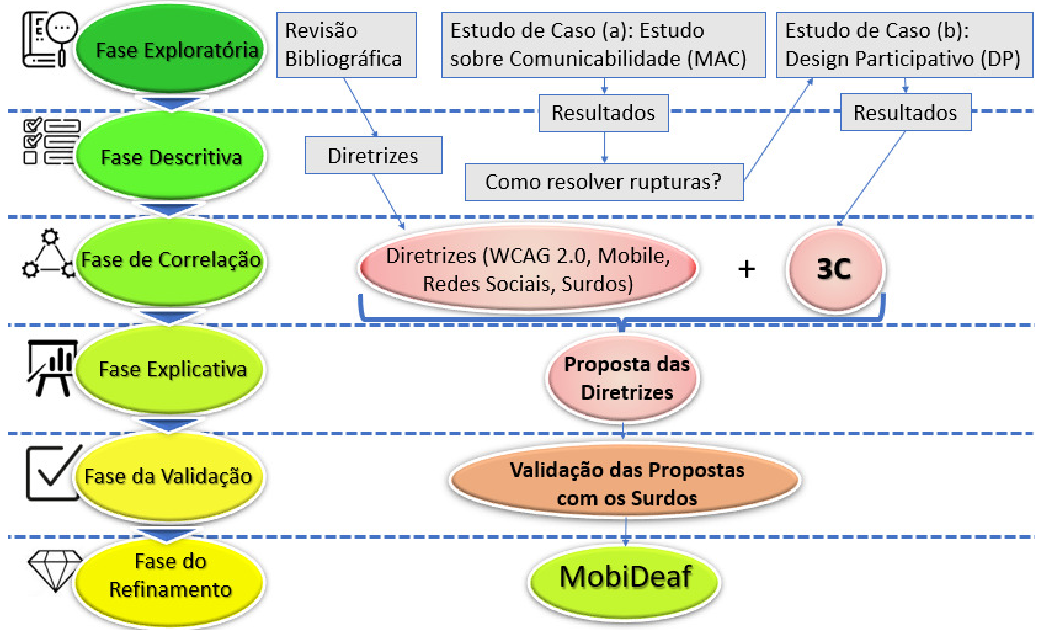 Figure 1: The six-phase methodology for establishing the MobiDeaf guidelines.
Experiments: MobiDeaf vs. WCAG
To prove the efficacy of the proposal, the researchers built two high-fidelity Android prototypes:
- Group A: Following WCAG 2.0 (The industry standard).
- Group B: Following MobiDeaf.
Results: Less is More
The results from 9 deaf participants were striking. In the "Complex Task" (posting a photo with a caption), the MobiDeaf prototype (GB) saw significantly fewer "Breakdowns" (interruptions where the user is confused).
| Metric | WCAG (GA) | MobiDeaf (GB) | Improvement |
|---|---|---|---|
| Total Errors | 39 | 8 | ~79.5% Reduction |
| Complex Task Time | 70.4s | 54.6s | 22.4% Faster |
| "Help" Requests | Frequent | Minimal | High Autonomy |
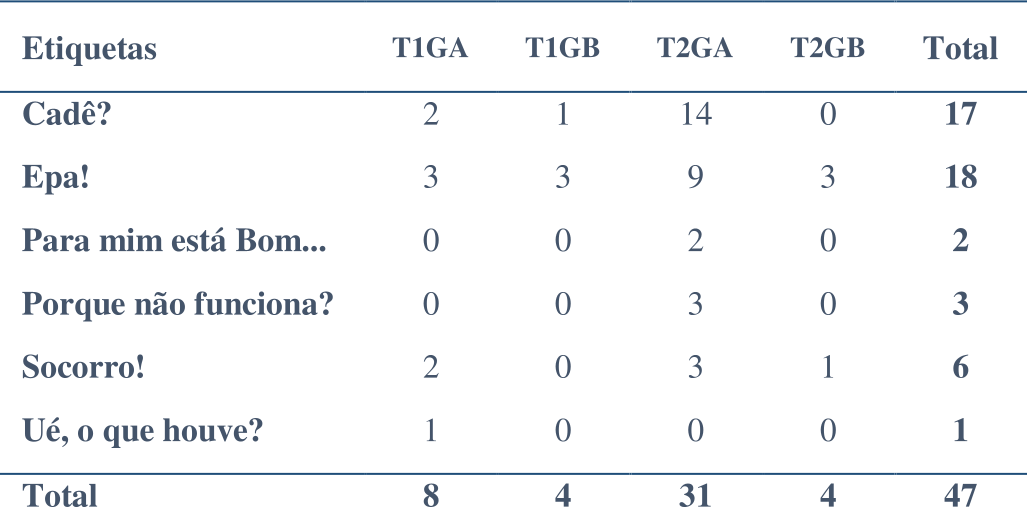 Table: Comparison of communication "tags" (errors). Note the massive drop in the "Cadê?" (Where is it?) tag for Group B.
Deep Insight & Future Outlook
The core takeaway is that accessibility is not just about translation; it's about architecture.
While General Guidelines (WCAG) ensure that a site can be used, MobiDeaf ensures that it is easy to use. The "Directional Interface" (MD2) is a particularly strong insight; by guiding the user through a linear path, it compensates for the cognitive load of navigating a second language.
Limitations: The study was conducted with Brazilian users (LIBRAS). While the UI principles are universal, the linguistic elements (SignWriting or specific signs) need regional adaptation.
Future Work: The integration of SignWriting (a visual script for sign language) could be the next frontier in making social media truly native for the deaf community, moving entirely away from "spoken-language" text.