
PoX: Taking Back Privacy Control from Social Media Giants
PoX: Protecting users from malicious Facebook applications
This paper introduces PoX (Proxy On the Client-Side), a security extension for Facebook designed to protect users from malicious third-party applications. By implementing a client-side proxy within the browser, PoX enables fine-grained access control over profile data, moving away from Facebook's "all-or-nothing" permission model.
TL;DR
Social networks like Facebook store a goldmine of personal data, yet third-party apps often demand total access or nothing at all. Enter PoX (Proxy On the Client-Side): a researcher-proposed system that places a "security guard" directly in your browser. It intercepts app requests, checks them against your personal privacy rules, and ensures that quiz apps don't get your home address unless you say so—all without needing Facebook’s permission to exist.
The Motivation: The "All-or-Nothing" Trap
Since the Facebook Platform launched in 2007, third-party apps have been a privacy nightmare. Traditionally, once you click "Allow," an app receives a Session Secret. This is a literal "key to the kingdom" that allows the app's server to talk to Facebook’s servers behind your back, harvesting anything from your birthday to your friends' private details.
The authors argue that Facebook has little incentive to fix this, famously quoting Mark Zuckerberg’s view that privacy is no longer a "social norm." Therefore, the solution must be client-side and decentralized.
Methodology: The Browser as a Reference Monitor
The core innovation of PoX is moving the access control logic from the cloud to the user's browser.
1. Stripping the Secret
A browser plug-in (developed for IE and Firefox) monitors the HTTP stream. When it detects a user visiting a Facebook app, it strips the session secret from the request. Without this secret, the third-party app is "blind"—it cannot talk to Facebook directly.
2. High-Fidelity Proxying
The app is then forced to use the PoX server-side library. When the app needs data, it sends a request back to a hidden IFRAME in the user's browser. This is the PoX Proxy.
- The Proxy checks an Access Control List (ACL).
- If approved, the Proxy uses its own credentials to fetch the data from Facebook and hands it back to the app.
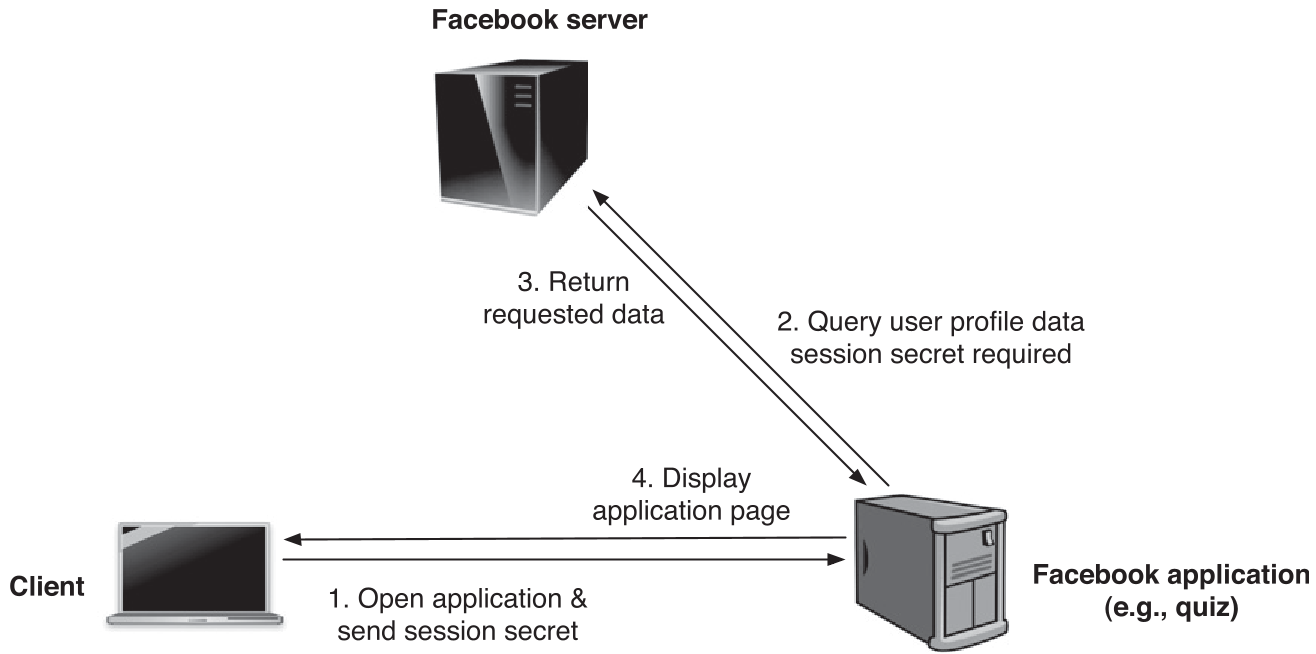 Figure: The modified data flow where the client-side proxy acts as the gatekeeper.
Key Performance Insights: Privacy with a Speed Boost?
One might assume that adding a proxy layer would slow down the user experience. The authors performed extensive stress tests using Ubuntu virtual machines and Firefox extensions to simulate realistic traffic.
The Findings:
- Initial Overhead: The first request is slower (~1 second) because the browser must load the proxy scripts and ACLs.
- Subsequent Speed: For follow-up requests, PoX actually outperformed the standard Facebook API. Why? Because the client proxy maintains a persistent HTTP connection, whereas standard PHP scripts on many app servers must re-establish a connection for every new page load.
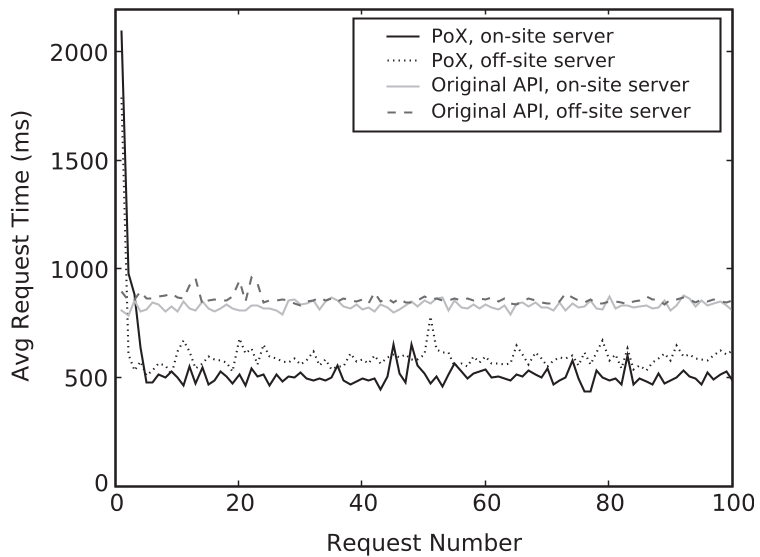 Figure: Comparing PoX performance against the original Facebook API under load.
Critical Analysis & Conclusion
PoX is a masterclass in adversarial deployment. It doesn't wait for Facebook to "do the right thing"; it gives users the tools to enforce the Principle of Least Privilege unilaterally.
Limitations
There are trade-offs. Since PoX signs requests using its own app ID, some Facebook features (like posting to a wall) will show the "PoX" icon instead of the specific app's icon. Furthermore, it requires developers to adopt a new library, though the authors emphasize this is a "drop-in" replacement.
Final Takeaway
The shift toward client-side privacy is more relevant today than ever. PoX proves that even in a centralized ecosystem, a clever combination of browser extensions and proxying can flip the power dynamic back to the user without sacrificing the performance that modern web apps require.