
With a Little Help From My Friends: Can Social Cues Solve the Privacy Paradox?
With A Little Help From My Friends: Can Social Navigation Inform Interpersonal Privacy Preferences?
This paper investigates the influence of "Social Navigation"—aggregated privacy choices from a user's social circle—on interpersonal privacy preferences within Instant Messaging (IM) systems. The study demonstrates that while social cues provide guidance, they are secondary to the inherent "privacy-sensitivity" of the specific system feature being controlled.
TL;DR
Managing privacy settings is a chore that most users avoid until it is too late. This paper explores whether telling users "what their friends are doing" can help them make better privacy decisions. While social navigation cues do influence behavior, the study finds that the inherent sensitivity of the data—what you are actually sharing—remains the most critical factor in user decision-making.
Background: The Burden of Choice
Most social platforms offer a labyrinth of privacy settings. Users often ignore these due to "interaction burden" or a lack of awareness. The authors hypothesize that humans, being social animals, look to their peers for behavioral cues. By showing users how their "buddies" configured their settings, could we simplify the decision-making process for complex privacy permissions?
Methodology: The "Fake" Installer
To get authentic results, the researchers used a clever deception. They invited participants to test a "new" IM installer.
- The Hook: Users logged into their real IM accounts (AOL, MSN, or Google Talk).
- The Variable: In the treatment group, users saw "Social Navigation" cues (e.g., "65% of your buddies chose this").
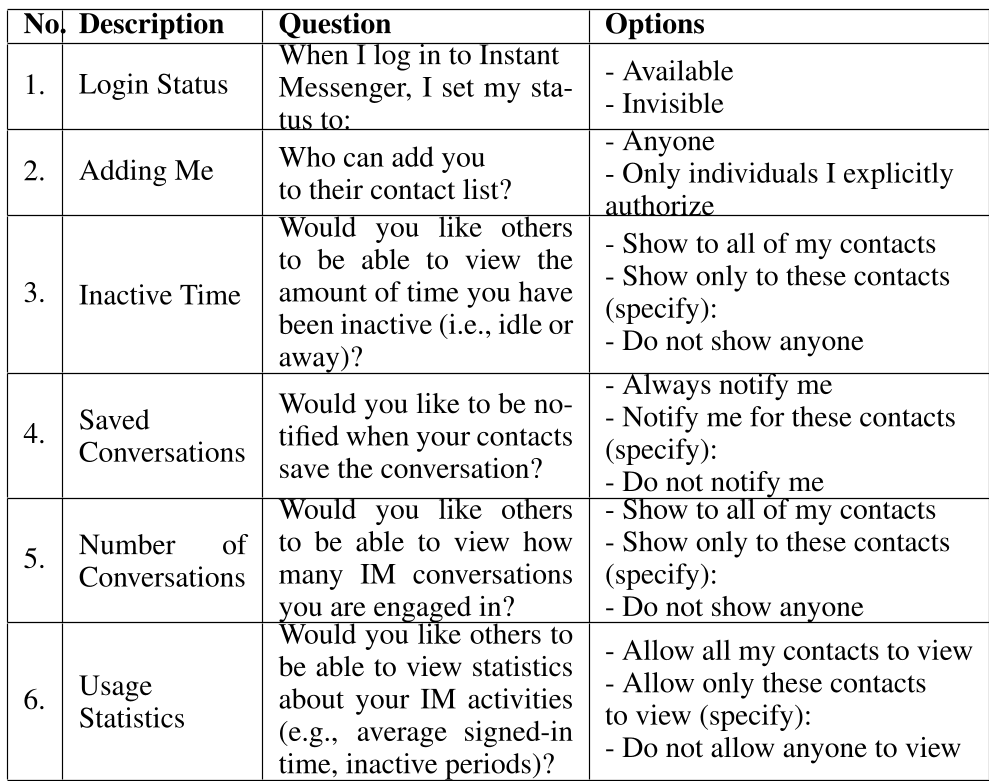
- The Settings: Six different settings were tested, ranging from login status to detailed usage statistics.
Key Insights: Sensitivity vs. Social Pressure
The study yielded several high-value takeaways for the HCI (Human-Computer Interaction) community:
1. The Power (and Limit) of Social Navigation
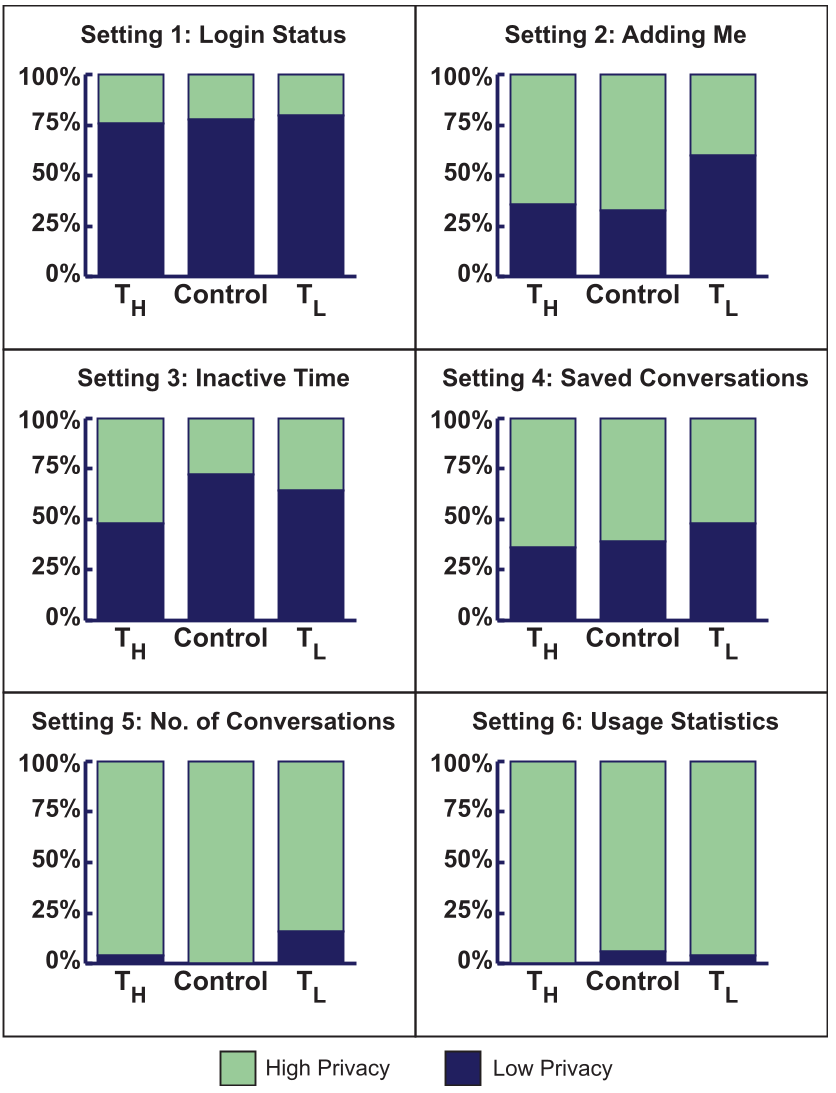
When told that friends preferred a high-privacy setting (), users were more likely to follow suit. Quantitatively, this resulted in a 75% increase in the odds of choosing higher privacy compared to the low-privacy cue (). However, this wasn't a magic bullet. Some participants felt these cues were "intrusive" or "patronizing," stating that their privacy is their own business, not their friends'.
2. Feature Sensitivity is King
The most striking finding was that the nature of the setting mattered more than the social cue. The researchers identified three tiers of sensitivity:
- Low Sensitivity: Login status and "inactive time" (visibility).
- Medium Sensitivity: Authorizing contacts and notification of saved chats.
- High Sensitivity: Number of active conversations and usage statistics.
In the high-sensitivity category (Settings 5 & 6), almost everyone chose maximum privacy, regardless of what they were told their friends did.
3. Usage Frequency Matters
The data revealed that daily users tended to choose lower privacy settings than infrequent users. This suggests that frequent interaction builds a level of comfort (or perhaps complacency) with the system, whereas "strangers" to the platform remain guarded.
Design Implications for the Future
- Privacy at Setup: The study suggests that the best time to ask for privacy preferences is during the installation or "onboarding" phase. This raises awareness before the user starts interacting with the platform.
- Group-Based Defaults: Instead of individual settings, systems should group features by their "sensitivity tier" and apply common-sense defaults (e.g., Opt-in for high sensitivity, Opt-out for low).
- The "Whitelist" Approach: Users rarely want to customize settings person-by-person. Instead, they prefer a global setting with specific "exceptions" (a whitelist or a blacklist).
Conclusion
Social Navigation is a powerful tool for guiding user behavior, but it cannot override the "physical" reality of data sensitivity. As we build more complex social systems, designers must respect the hierarchy of privacy: first, secure the most sensitive data with strong defaults; second, use social cues to help users navigate the nuanced trade-offs of social presence.
Note: This research was presented at CSCW '11 and remains a foundational study in understanding the intersection of social influence and digital privacy.